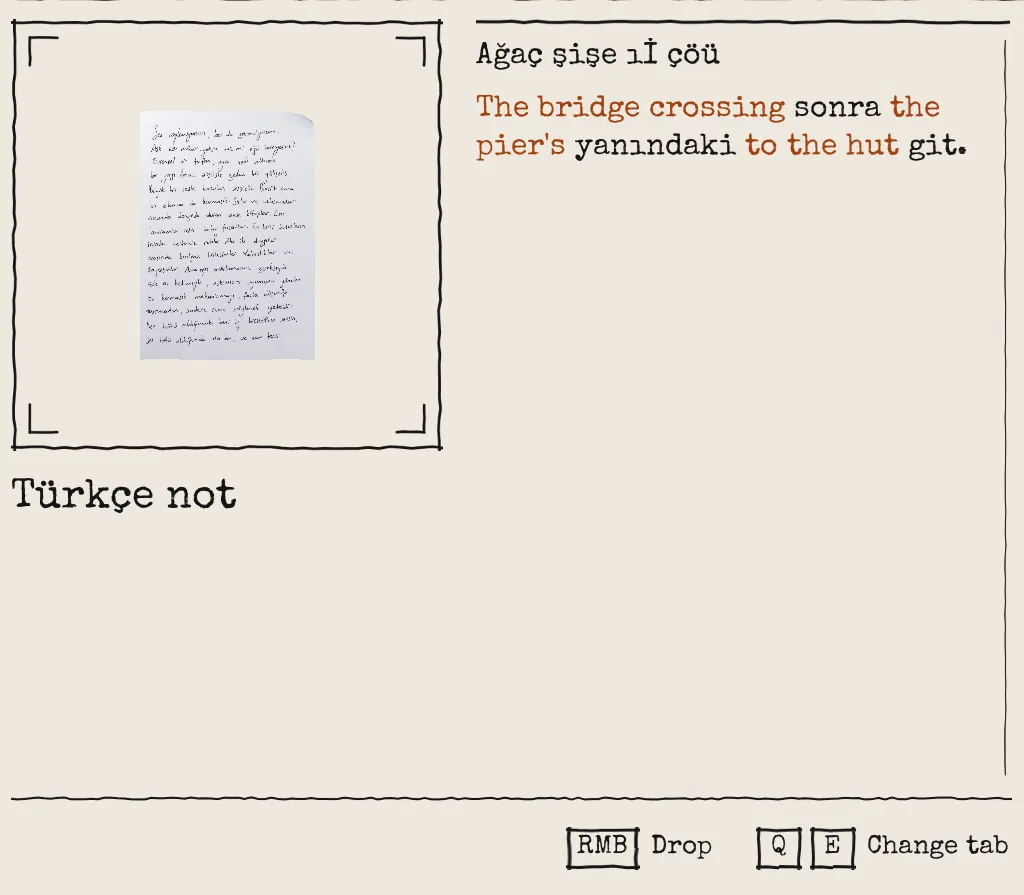

Notes in Anoda are written in Turkish and become readable one word at a time. Here is how that works in UE5 C++: the data, the note parser, the rich text reveal and the carved word stones, plus a Turkish casing bug as a bonus.
The idea
Notes in Anoda (working title), a first-person narrative exploration game I'm building solo in Unreal Engine 5.8, are written in Turkish. At first you can't read them. As you learn words from carved stones, quest rewards or items, every note shows those words in English, in place. A note gets more readable the longer you play. It never unlocks all at once.
This is a gameplay mechanic, not engine localization. One note is half Turkish and half English, and the split depends on the game progression.
A word is a table row
Each word is one row of a DataTable. The row name is the dictionary form in lower case (gitmek, to go). Forms lists the inflected spellings that count as the same word, because Turkish builds words with suffixes.
USTRUCT(BlueprintType)
struct FAnodaWordRow : public FTableRowBase
{
	GENERATED_BODY()

	/** What the word means in the player's language ("to go"). Shown when the word is learned. */
	UPROPERTY(EditAnywhere, BlueprintReadOnly, Category = "Word")
	FString Meaning;

	/** The other written forms that count as this word, lower case, no punctuation ("git", "gitme", "giden"). */
	UPROPERTY(EditAnywhere, BlueprintReadOnly, Category = "Word")
	TArray<FString> Forms;

	/** Known from the first minute of a new game. */
	UPROPERTY(EditAnywhere, BlueprintReadOnly, Category = "Word")
	bool bKnownAtStart = false;
};
A game instance subsystem loads the table and builds one map from every normalized form to its row name.
- The row name always counts as one of its own forms.
- If two rows claim the same form, the first row keeps it and a warning is logged.
- Known words are a
TSet<FName>of row names.
Every way to learn a word (a stone, a quest reward, a dialogue action, an item) ends in one private Teach function. It adds the word, plays the new-word sound and shows a toast. A word already known does nothing.
Pairing a note with its translation
Each note item has two text fields. ForeignText is what the note says. TranslatedText is my word-by-word gloss. They pair by position: the nth Turkish word goes with the nth English word.
ForeignText:     Fener nerede?
TranslatedText:  the_lantern where?
An underscore joins a multi-word translation into one slot. If the player knows fener, the note reads: the lantern nerede?
TArray<FParsedWord> ULocalizationSubsystem::ParseNote(const FString& ForeignText, const FString& TranslatedText) const
{
	// One entry per token of the note: each word with the whitespace that follows it.
	TArray<FParsedWord> Result;
	// An empty note has nothing to parse.
	if (ForeignText.TrimStartAndEnd().IsEmpty()) { return Result; }

	// The gloss words, in order: the nth one pairs with the nth foreign word.
	// A token can be whitespace only (before the first word), so empty words are skipped.
	TArray<FString> AuthorWords;
	for (const FNoteToken& Token : SplitWords(TranslatedText))
		if (!Token.Word.IsEmpty()) { AuthorWords.Add(Token.Word); }

	int32 WordIndex = 0;
	for (const FNoteToken& Token : SplitWords(ForeignText))
	{
		FParsedWord& Parsed = Result.AddDefaulted_GetRef();
		Parsed.Separator = Token.Separator;
		if (Token.Word.IsEmpty()) { continue; } // the whitespace before the first word

		SplitPunctuation(Token.Word, Parsed.Leading, Parsed.Text, Parsed.Trailing);
		const int32 Index = WordIndex++;
		// A note whose translation runs short keeps the rest foreign (data validation flags it).
		if (!Parsed.Text.IsEmpty() && AuthorWords.IsValidIndex(Index) && IsKnownWord(Parsed.Text))
		{
			// The author's own punctuation goes; the foreign word's stays around the translation.
			FString AuthorLeading, AuthorWord, AuthorTrailing;
			SplitPunctuation(AuthorWords[Index], AuthorLeading, AuthorWord, AuthorTrailing);
			Parsed.Text = AuthorWord.Replace(TEXT("_"), TEXT(" "));
			Parsed.bIsTranslated = true;
		}
	}
	return Result;
}- Whitespace and line breaks are kept exactly as written.
- Known is decided per form for the whole game, not per note. Learning a word updates every note at once.
- Position pairing has one weak spot: a single missing word shifts every translation after it. Data validation on the item asset raises an error when the two word counts differ, so the mistake shows up in the editor, not in a player's hands.
Adding a note, in practice:
- Write the note: the Turkish in
ForeignText, the word-by-word gloss inTranslatedText. - Add each new word to the table as a row (dictionary form, meaning, forms). A new spelling of a known word goes into that row's
Forms. The table's source is a CSV, so this is plain text editing. - Validation and tests check that the note and the table line up.
The table only holds words the notes use, not a whole dictionary. A note word with no row simply stays in Turkish.
Drawing the reveal
The note body is a URichTextBlock. The parsed words become markup: each translated word wrapped in a Learned tag, everything else escaped.
FString UAnodaInspectWidget::NoteMarkup(const TArray<FParsedWord>& Words)
{
	FString Markup;
	for (const FParsedWord& Word : Words)
	{
		Markup += EscapeMarkup(Word.Leading);
		// Learned words get the Learned style (another colour); the rest stay plain.
		if (Word.bIsTranslated && !Word.Text.IsEmpty())
			Markup += FString::Printf(TEXT("<%s>%s</>"), LearnedStyle, *EscapeMarkup(Word.Text));
		else
			Markup += EscapeMarkup(Word.Text);
		Markup += EscapeMarkup(Word.Trailing);
		Markup += Word.Separator;
	}
	return Markup;
}
The tag only says which words are learned. What a tag looks like lives in a style table: a small DataTable with two rows, Default for the body and Learned for learned words. Same font, different colour (orange ink on the paper style).
So the two jobs are separate:
- Once, when the HUD creates the inventory screen: set up the style table. Opening and closing the inventory only shows and hides it, so this doesn't run again.
- Every time a note opens: parse it and write the text with tags.
The style table is built in one function:
FRichTextStyleRow Body;
Body.TextStyle.SetFont(Font);
Body.TextStyle.SetColorAndOpacity(FSlateColor(Ink));
FRichTextStyleRow Learned = Body;
Learned.TextStyle.SetColorAndOpacity(FSlateColor(LearnedInk));

// A new table each time: SetTextStyleSet rebuilds only when it is handed a different table.
NoteStyles = NewObject<UDataTable>(this);
NoteStyles->RowStruct = FRichTextStyleRow::StaticStruct();
NoteStyles->AddRow(TEXT("Default"), Body);
NoteStyles->AddRow(LearnedStyle, Learned);
NoteRichText->SetTextStyleSet(NoteStyles);
One catch: the player can switch to a readable font (IBM Plex Mono instead of Special Elite), which means building the style table again. SetTextStyleSet ignores a table it has already been given, so the function creates a new table each time it runs.
The Vocabulary tab in the inventory lists every learned word with its meaning, sorted in Turkish alphabet order (abcçdefgğhıijklmnoöprsştuüvyz), not by code point.
Word stones
Word stones are carved stones that teach one word when you interact with them. The mesh is a Megascans grave stone with its original inscription masked out. The word is drawn with the Runtime Text Decal plugin from Fab, which renders text with a Canvas into a render target and feeds it to a decal material.
void UWordStoneComponent::ShowWordOnDecal()
{
	UTextDecalComponent* Decal = FindDecal();
	if (!Decal) { return; }

	// The row name is the table's spelling. NormalizeWord lower-cases it the Turkish way,
	// because a cooked build can hand an FName back in another casing ("Su" for "su").
	const FString Spelling = Word.IsNone() ? FString() : ULocalizationSubsystem::NormalizeWord(Word.ToString());
	Decal->SetText(FText::AsCultureInvariant(Spelling));

	// A text redraw can hand the decal a fresh material instance (after a Blueprint compile).
	SetDustFill(DustFill);
}

void UWordStoneComponent::SetDustFill(const float Fill)
{
	DustFill = Fill;
	// The plugin swaps the decal material for its own dynamic instance to feed it the text;
	// DustFill rides on that same instance, so the text keeps working.
	const UTextDecalComponent* Decal = FindDecal();
	if (UMaterialInstanceDynamic* Material = Decal ? Cast<UMaterialInstanceDynamic>(Decal->GetDecalMaterial()) : nullptr)
	{
		Material->SetScalarParameterValue(WordStoneDustFillParameter, Fill);
	}
}- The word is picked from a dropdown filled from the word table.
- The text is set on register, so it shows in the editor viewport too.
- The font is a 128 pt runtime copy of Marcellus, so the carved word stays sharp on the decal.
- A
DustFillmaterial parameter is set at BeginPlay from whether the word is known. On first read it animates over 0.97 s, timed to the hit of the new-word sound. - The plugin swaps the decal material for its own dynamic instance.
DustFillhas to live on that instance and be set again after every text redraw, because a redraw can hand back a fresh one.
Later: a main language and a secondary language
Today there is one note language (Turkish) and one reading language (English). The plan for later: the player picks a main language, the one they already know, where translations appear. Then a secondary language, the one the notes are written in and the one they decipher.
Words, forms, meanings and note texts are already data. What is still tied to one language: a single word table, the Turkish spelling rule and sort order, and saved words with no language prefix.
Bonus: Turkish breaks ToLower
Turkish has two i's. Dotted: İ and i. Dotless: I and ı. FChar::ToLower maps I to i, which is right in English and wrong in Turkish. IŞIK (light) becomes işik, which is not a word, so the lookup fails.
So every word goes through one normalization: letters and digits only, each lowered the Turkish way.
TCHAR ToTurkishLower(const TCHAR Char)
{
	switch (Char)
	{
	case TEXT('I'): return TEXT('ı');
	case TEXT('İ'): return TEXT('i');
	case TEXT('Ç'): return TEXT('ç');
	case TEXT('Ğ'): return TEXT('ğ');
	case TEXT('Ö'): return TEXT('ö');
	case TEXT('Ş'): return TEXT('ş');
	case TEXT('Ü'): return TEXT('ü');
	// ... Â Î Û
	default: return FChar::ToLower(Char);
	}
}

FString ULocalizationSubsystem::NormalizeWord(const FString& Word)
{
	FString Normalized;
	Normalized.Reserve(Word.Len());
	for (const TCHAR Char : Word)
	{
		// Letters and digits only, so punctuation, apostrophes ("İstanbul'da") and spaces go.
		// FChar::IsAlnum is the CRT's iswalnum, which counts Turkish letters as letters.
		if (FChar::IsAlnum(Char))
		{
			Normalized.AppendChar(ToTurkishLower(Char));
		}
	}
	return Normalized;
}
The rule caused a second bug that only showed in cooked builds. FName compares ignoring ASCII case and keeps the casing of an equal name registered earlier. So the row su (water) can come back as Su, and in as In. Run In through the Turkish rule and you get ın, a different word.
The fix has two parts:
- Row names are lowered with ASCII rules first.
- Code that already holds a row name matches it by
FName, instead of normalizing it again.
Anoda (working title) is in development at Scevro Studio. Follow along on X: @ScevroStudio.